Guide
ATS-friendly CV: 10 rules to get past AI screening in 2026
How to write an ATS-friendly CV in 2026: 10 rules, a pre-send checklist and data on how long recruiters really spend on each CV.
Sending out CVs and hearing nothing back? Often the problem is not your experience but how it reads on the page. Today your CV is read by software first and a person second, and both make up their minds in seconds.
Key points
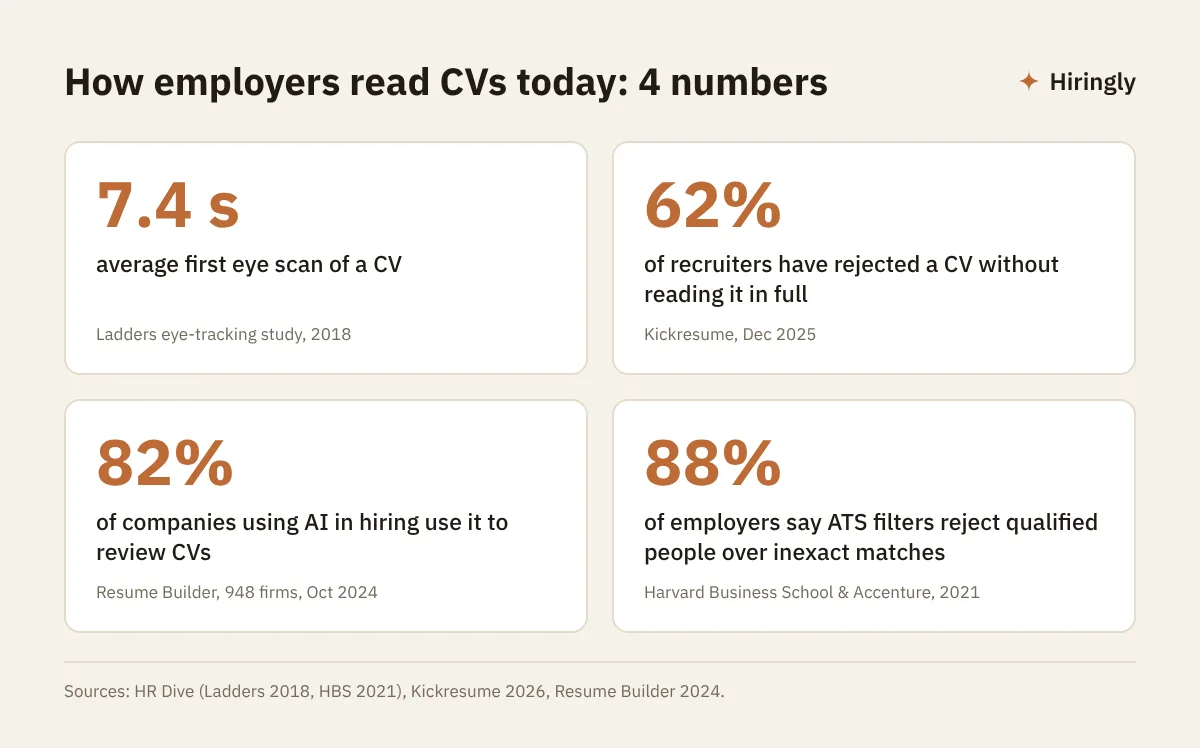
- A recruiter's first eye scan of a CV lasts 7.4 seconds on average, according to a Ladders eye-tracking study.
- 62% of recruiters have rejected a CV without reading it in full (Kickresume, 2026).
- ATS and AI tools look for a match with the job ad: the same skill names, clear headings and a readable layout.
- A simple single-column CV in PDF or DOCX parses better than a designed one.
- Under the GDPR, a hiring decision in the EU should not be left to a machine alone.
Who reads your CV first
At large employers, and increasingly at small ones, a recruiter is no longer the first to open your CV. An ATS (applicant tracking system) gets there first. It extracts the text and drops it into fields.
AI is now often layered on top. A Resume Builder survey of 948 business leaders from October 2024 found that 51% of companies used AI in hiring and 68% expected to by the end of 2025. Among companies using AI in hiring, 82% used it to review CVs.
For a look under the hood, read our guide What is an AI ATS and how to choose one.
Then a human steps in, in a hurry
A Ladders eye-tracking study measured the first skim of a CV at 7.4 seconds on average. Simple layouts with clear headings and bullet points held attention best. Cluttered, multi-column layouts with long sentences did worst.
A more recent Kickresume survey from December 2025 shows that deeper reading happens once a CV clears the first filter. Still, a quarter of recruiters spend under 30 seconds on a CV.
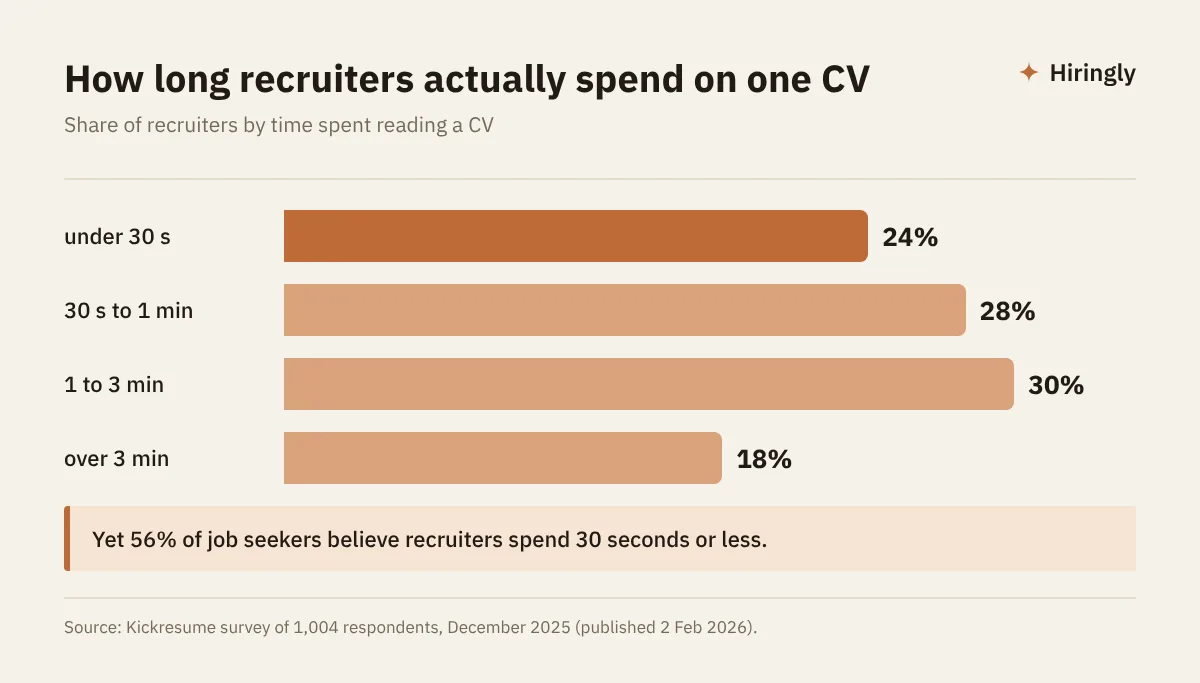
Czech job board Jobs.cz describes the same reality: the first check takes two minutes, one minute or sometimes just 20 seconds. Recruiters scan for keywords and relevant experience, mostly from the last 5 to 10 years.
Why good candidates get filtered out
Software cannot read between the lines. If the ad says "accountant" and your CV says "finance department specialist", the system may not see a match.
In a report by Harvard Business School and Accenture, 88% of employers admitted their systems rejected qualified, high-skilled candidates simply because they did not exactly match the criteria. Missing degrees and career gaps were typical triggers.
The most common reasons a system or a recruiter sets a CV aside:
- Unreadable layout: text inside images, tables, two columns, icons instead of words.
- Missing keywords: your skill names differ from the ones in the ad.
- Vague headings: "My journey" instead of "Work experience".
- Fuzzy skill levels: "basic knowledge" with no level or years attached.
- Unexplained gaps: a year off with no context at all.
10 rules for an ATS-friendly CV
Layout and structure
- 1One column, no graphics. Photos, icons, skill bars and text boxes often do not parse.
- 2Text-based PDF or DOCX. Not a scan, not an image. Try selecting and copying text from your PDF: if you cannot, neither can the ATS.
- 3Standard headings. Work experience, Education, Skills, Languages. Save the creativity for the content.
- 4Contact details in the body. Keep your name, phone and email out of the header and footer, which some systems skip.
Content and keywords
- 5Mirror the job ad. If the company asks for "SAP FI" and "month-end close", write exactly that, not just "ERP".
- 6Use the acronym and the full term. For example "project management (PMP)" or "Microsoft Excel (pivot tables)".
- 7Numbers beat adjectives. "Cut transport costs by 12%" says more than "significantly improved logistics".
- 8State skill levels precisely. English C1, advanced Excel, five years of Python. Not "good knowledge".
- 9Explain gaps in one line. Parental leave, study, caring for family, a sabbatical. One line gives both the system and the recruiter context.
- 10Tailor every application. Kickresume found that 74% of job seekers adjust their CV for each role. If you do not, you are giving away points.
Note: do not hide "invisible" keywords in white text. Modern systems show the parsed text to the recruiter, and the trick backfires.
Quick test: is your CV ready?
| Check | Passes | Fails |
|---|---|---|
| Layout | one column, bullets | two columns, text boxes |
| File type | text-based PDF or DOCX | scan, image, JPG |
| Skills | same wording as the ad | your own synonyms |
| Achievements | numbers and outcomes | generic adjectives |
How AI actually scores your CV
Modern AI applicant tracking systems do more than count keywords. They compare your experience and skills with the requirements in the ad and suggest a ranking.
Good systems also explain each candidate's fit. The free AI ATS Hiringly, for example, ranks applicants by fit and writes a short reason for each one, keeps data in the EU and always leaves the next step to a person. Our article on AI candidate screening shows how this looks from the employer's side.
The takeaway for job seekers is simple. Clear, specific experience is easy for AI to find and match. Vague experience gets lost, however strong it is.
What the law says
Article 22 of the GDPR gives people the right not to be subject to a decision based solely on automated processing. Recital 71 names e-recruiting without human intervention as an example.
The EU AI Act also classifies AI used in recruitment as high risk. Our EU AI Act in recruiting guide covers what that means and when each rule applies.
Pre-send checklist
Before you hit "Apply", check that:
- The job title from the ad appears in your CV, ideally in the summary.
- The top 3 to 5 requirements from the ad appear in your CV in the same words.
- Your CV has one column and standard headings.
- Text in your PDF can be selected and copied.
- Contact details sit in the body, not the header.
- Each role lists 2 to 3 results with numbers.
- Languages carry a CEFR level (A1 to C2).
- Any career gap has one line of explanation.
- The file has a clear name, such as Jane-Smith-CV.pdf.
Ready? Browse open roles from companies already using an AI ATS on the Hiringly job board.
FAQ
Does an ATS-friendly CV need a photo?
No. Photos are common in Czechia and parts of Europe, but software cannot read them and they should play no part in assessing fit. If you include one, make sure it does not break the text layout.
Is PDF or Word better for an ATS?
Both work if they contain real text. Avoid scans and PDFs made from images. If the ad specifies a format, use it.
Can AI tell I wrote my CV with ChatGPT?
That is the wrong worry. Generic phrases without numbers or concrete projects look weak to both software and people. AI can help with wording, but the facts and results must be yours.
Can AI reject me before a human sees my CV?
In the Resume Builder survey, 21% of companies said they let AI reject candidates without human review. In the EU, the GDPR gives you the right to human review of a decision made solely by automated means, and you can ask how the selection was made.
How long should a CV be?
One to two pages for most roles. Longer careers fit if you shorten older roles to one line and keep the detail for the last 5 to 10 years.
AI recommends, a human decides.
Hiringly shows the reasoning for every candidate, stores data in the EU and never rejects anyone automatically.